The StyleSmuggler Magento zero-day: how it works and how to check your store
StyleSmuggler is a live, unpatched remote-code-execution flaw in Magento and Adobe Commerce that has been backdooring stores since 4 September 2026, and because it compromised a fully patched store, staying current is not protecting anyone on its own. This piece walks through exactly how the attack works, from the code hidden in Magento's template system to the failed-payment email that runs it and the self-reinstalling backdoor it leaves behind, then gives you the specific processes, files, cron entries and commands to check your own store. It ends with what to do now that Adobe has shipped an emergency hotfix (APSB26-146, CVE-2026-75650), and the evidenced case that a Magento store needs a layered security posture, not just a patching schedule.
DC · 6 September 2026 · 11 min read
 ✦AI generated
Update, 8 September 2026. Adobe has broken its schedule and shipped an emergency hotfix for this flaw, APSB26-146 (now CVE-2026-75650, CVSS 10.0). If you run Magento or Adobe Commerce, patching is now the priority: jump to what to do now.
The patch is out: what to do now
On 7 September 2026 at 20:20 UTC, a day after the attacks began, Adobe broke its release schedule and published an emergency hotfix, APSB26-146, rated Priority 1, its highest. The flaw now carries an identifier, CVE-2026-75650, scored CVSS 10.0, the maximum. Adobe's fix closes the hole at the root: Magento no longer instantiates an attacker-named class before checking its type. The advisory covers every release from 2.4.4 to 2.4.9.
- Apply the hotfix. Install Adobe's patch (VULN-39341 / APSB26-146) on every store, on staging first and then production, without waiting for your next release window.
- Rotate your encryption keys. Adobe is explicit that the patch alone is not enough: rotate the encryption key, and to be safe your admin, API and integration credentials, in case the store was reached before you patched.
- Assume the pre-patch window was hostile. If your store was internet-facing and unpatched at any point from 4 September, treat it as potentially compromised and run the indicator checks further down before you trust it.
In short: the mitigations later in this article were what bought time before a patch existed. Now that APSB26-146 is out, applying it is the first move, and everything below is defence in depth plus the compromise check you should still run for the days your store spent exposed.
GraphQL was the door, not the flaw
One point is worth being precise about, because it changes what you do after patching. StyleSmuggler arrived through the GraphQL endpoint, but GraphQL is not where the flaw lives. The attacker used a GraphQL request to smuggle PHP in through Magento's styles and template handling; the vulnerability itself is in how Magento then instantiated an attacker-named class without checking its type first [1]. Adobe's hotfix fixes that class instantiation. It does not change GraphQL at all [5].
So disabling GraphQL was only ever a temporary mitigation, a way to shut the door while there was no patch [1]. Now that APSB26-146 closes the actual hole, the door does not need to stay shut. If you turned GraphQL off as a stopgap, you can turn it back on once the patch is applied and verified.
And you almost certainly want to. GraphQL is not an optional extra on a modern Magento store. It is the interface that headless and PWA storefronts, mobile apps and a good deal of integrations talk to. Classic and Hyva themes can run without it, which is why disabling it was viable as a stopgap for those stores [1], but for anyone running headless or an app, GraphQL off means the storefront is off. Leaving it disabled after patching trades a fixed vulnerability for broken functionality, and it removes one of the things that makes Magento adaptable in the first place. Patch, verify, then turn it back on.
The first three days
This did not build up over months. It went from first exploit to backdoored stores in hours, and the reason it matters is that there is still nothing to install. Here is the run so far, in UTC [1][2].
◆ StyleSmuggler, hour by hour
- 4 Sep, 22:20Pivotal
First confirmed exploitation in the wild
The attack starts. No public disclosure yet, no CVE, no patch.
- 4 Sep, 23:10
Implant seen on unrelated stores
Sansec's eComscan flags the same backdoor on unrelated stores, confirming it is spreading, not a one-off.
- 5 Sep, 07:15
Real-time blocking begins
Sansec Shield starts blocking the attack. Other scanners have not yet recognised the implant.
- 5 Sep
Public disclosure, early
Sansec discloses publicly and early, because stores are being compromised right now.
- 6 SepPivotal
Still no patch
No CVE, no Adobe advisory, no workaround from Adobe. Independent reports describe stores fully backdoored within eleven to fourteen hours of first contact.
- 7 Sep, 20:20 UTCPivotal
Adobe ships an emergency hotfix
Out of band, Adobe publishes APSB26-146 (CVE-2026-75650, CVSS 10.0, Priority 1), fixing the flaw for 2.4.4 to 2.4.9. Apply it and rotate keys.
If you take one thing from that timeline, take this: the defenders who moved in hours are fine, and the ones waiting for a vendor advisory are the victims. That is the whole shape of this incident, and it is why the checks below are worth running today rather than after the bulletin.
The attack, stage by stage
StyleSmuggler is an unauthenticated chain, which means the attacker never logs in. It works in three moves, and the clever, nasty part is the middle one [1][2].
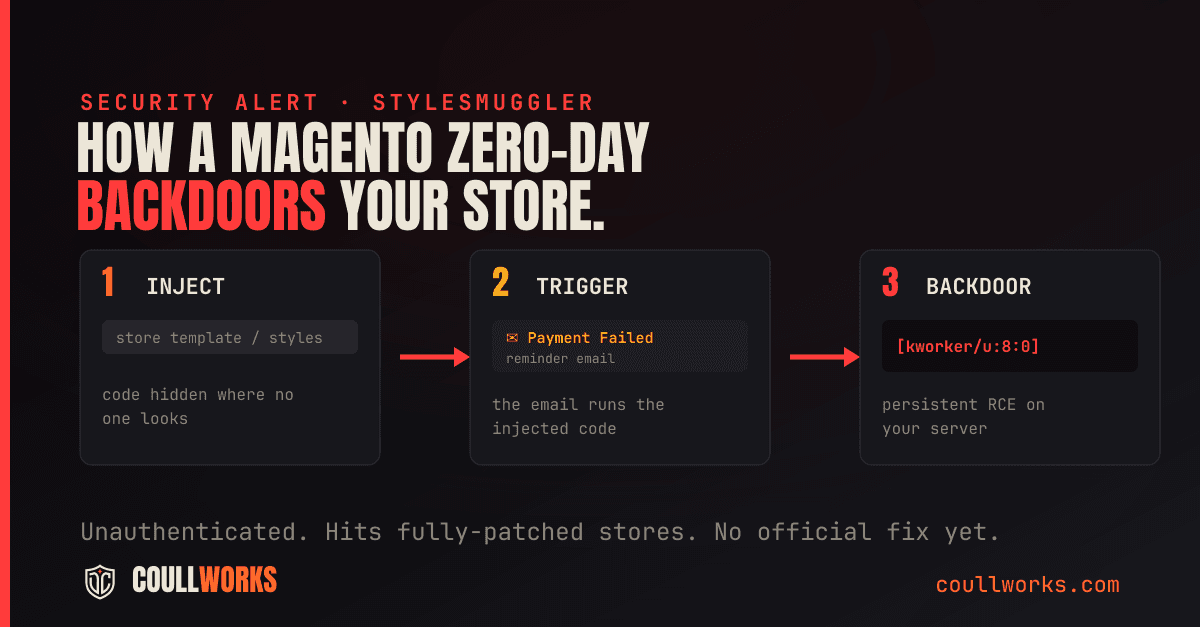
1. Inject. The attacker sends a request to Magento's GraphQL endpoint that abuses the platform's template and styles handling to smuggle PHP into a place Magento will later read back. Nothing runs yet. The payload just sits there, planted, waiting for the store itself to pick it up [1][2].
2. Trigger. This is the twist. The attacker does not run the code. Your store does. The chain causes Magento to render a Payment Transaction Failed Reminder email, and the code runs while Magento renders the message, so no one has to open it [1]. No click, no human, no inbox. A routine email job executes the attacker's PHP as it builds the message, which is why nothing on the front end ever looks wrong.
3. Backdoor. What lands is a persistent implant: a background process, built as a stripped Rust binary, that disguises itself as a Linux kernel worker and phones home to a command-and-control server over an encrypted connection, waiting for orders. It rewrites a cron entry so that killing the process just brings it back five minutes later [1][2]. That self-reinstall is why spot it and delete the file is the wrong instinct, and it is exactly why the next section matters.
Is your store already carrying it?
Run these checks now. If any one of them turns something up, treat the store as compromised and act on that basis; do not talk yourself out of it. The indicators come from Sansec's write-up and independent incident reports [1][2].
| Where to look | What a compromise looks like |
|---|---|
| Running processes | A process named [kworker/u:8:0] but owned by a normal, non-root user. Real kernel workers are always owned by root. |
| Filesystem | ~/.local/share/.gvfsd/gvfsd-user, a lock file .gvfsd_<8 hex>.lock in the same folder, and anything matching /tmp/.kw_*. |
| Crontab | A line running every five minutes: */5 * * * * exec <home>/.local/share/.gvfsd/gvfsd-user. This is the persistence. |
| Outbound network | An encrypted WebSocket to 99.84.67[.]186:443, and malware hosting at 247.cdnflare[.]xyz. |
| Magento mail and logs | Odd Payment Transaction Failed Reminder emails with unresolved {{var ...}} tags, .invalid sender domains and zero totals; in earlier variants an X_TRACE_ marker in var/report/ or an X-TRACE- header. |
Two quick commands start the hunt: list processes and grep for kworker to catch a non-root kernel worker, then read the crontab and list the suspicious paths. On a clean server both come back empty.
Sansec also publishes SHA256 hashes of the implant, for example e315687a1dfe61ef4a5a5642214db6d3b2b05d81391285eebc2af664641a26a7 [1]. I have not reproduced the full list here, because it drifts as new variants appear, so pull the current set from the Sansec write-up before you rely on hashes alone.
Buying time, and defence in depth
Adobe's hotfix is the fix, and applying it (above) comes first. The steps here still matter: for the gap before you can deploy the patch, for headless stores that cannot simply drop GraphQL, and as defence in depth. In priority order:
◆ The stopgap playbook, in priority order
- 1
Disable GraphQL
The exploit comes in through the GraphQL endpoint, so turning it off closes the front door. This is a temporary measure only: once APSB26-146 is applied and verified, re-enable GraphQL, because the patch, not the disable, is what fixes the flaw. The catch while it is off: a headless or PWA storefront depends on GraphQL and cannot simply switch it off, so if that is you, jump to the edge rule instead.
- 2
Block the pattern at the edge
A WAF or reverse-proxy rule that rejects GraphQL POSTs carrying the styles[ parameter and template directives gives cover without touching the app. Know the limit: a web server cannot fully inspect a POST body, so this class of rule is partly bypassable. Treat it as a layer, not a guarantee.
- 3
Scan for the implant
Sansec's eComscan detects the backdoor, and Sansec Shield was blocking the attack from early on 5 September. No Sansec? Hunt manually for the indicators above.
- 4
Harden the box
Add proc_open to PHP's disable_functions and mount /tmp with noexec, so even a successful injection struggles to spawn its process.
- 5
Use the community mitigation with eyes open
Disrex Group published emergency web-server rules and a CLI guard on GitHub. Read their own warning first: it was written with AI assistance, during a live incident, in a few hours, has not been through review, and is not a fix. Test on staging before anywhere near production.
- 6
If you find the backdoor, assume full compromise
Do not just delete the file. Rotate everything: admin, database, API, integration and payment keys, and get someone who knows Magento to clean it, because the cron persistence and process-faking are built to survive a naive cleanup.
- 7
Apply Adobe's hotfix
APSB26-146 shipped on 7 September 2026 (CVE-2026-75650). Deploying it, and rotating your keys, is now the top priority, above every stopgap in this list.
Patching is a layer, not a plan
Here is the part worth sitting with. The first store known to be hit was on 2.4.6-p15 with July and August's updates applied, the highest patch level Adobe ships for that line. Sansec reproduced the full chain on clean 2.4.7, 2.4.8 and 2.4.9 [1]. There was no version you could be on, and no patch you could apply, that would have stopped it, because the flaw was a zero-day with no fix in existence. The people who did everything right were exploited anyway.
The first store hit was patched to the highest level Adobe ships. There was no patch you could have applied. That is what a zero-day means.
The standard Magento security advice has always been to stay patched, and it is correct. But it protects you only against the known and fixed, and there is always a window: between a flaw being exploited and a patch existing, and between a patch existing and a store applying it. Attackers live in that window, and StyleSmuggler is what it looks like when the window is wide open.
We watched the second kind of window play out weeks ago. SessionReaper, CVE-2025-54236, was a critical unauthenticated RCE in Adobe Commerce and Magento, scored 9.1, patched by Adobe in an emergency release on 9 September 2025 [4]. A month later, when mass exploitation began, the fix existed and most stores simply had not applied it in time. StyleSmuggler is the sharper version of the same story: this time there was no patch to apply at all when the attacks started.
Both incidents point at the same gap, and only a layered posture covers it:
- Edge or virtual patching, and a WAF, so you can answer a zero-day in minutes with a rule instead of waiting days for a vendor.
- File-integrity monitoring, so a new PHP file or a fake kernel process trips an alert fast. StyleSmuggler is exactly the kind of change this catches.
- Least privilege, so a compromise of the web user does not become a compromise of the whole server.
- Active monitoring and an incident plan, because the reported stores were fully backdoored inside eleven to fourteen hours. Speed of detection is the whole game.
None of that replaces patching. Apply Adobe's updates promptly, always. The point is that update discipline is one layer of several, and StyleSmuggler is the proof: the store that patched correctly still got backdoored, because patching was never going to catch a flaw with no patch.
Not the same thing as checkout skimming
Worth being precise, because the two get muddled. Checkout skimming is client-side: malicious JavaScript in the browser copying card numbers as a customer types, the Magecart pattern, which PCI DSS 4.0 has specific script-control rules for. StyleSmuggler is server-side: an attacker running code on your server and leaving a backdoor, with no card-skimming JavaScript in the cases reported so far [2]. Different surface, different defences, and a serious store has to cover both.
Where CoullWorks fits
Fifteen years in Magento, and this is the exact situation where owners get caught: patched, assuming they are safe, while a zero-day walks straight past the update schedule. If you are not sure where your store stands, I run a security review that checks your patch level, your GraphQL and edge configuration, whether these indicators are present, and where your monitoring has gaps. Send it over and I will tell you straight, including if it turns out you are already in good shape.
◆ Glossary
- Zero-day
- A flaw being exploited before the vendor has a fix, so there is no patch to apply. StyleSmuggler is one.
- Unauthenticated RCE (remote code execution)
- An attacker running their own code on your server without logging in. The most severe class of web flaw, because it hands over the machine.
- Backdoor
- Hidden code left behind so the attacker can return later, even after the original hole is closed. This one reinstalls itself via cron.
- GraphQL
- The query interface Magento exposes for headless and app storefronts. It is the entry point StyleSmuggler abuses, which is why disabling it is the front-line move.
- Indicator of compromise (IoC)
- A specific, checkable sign of an attack: a file, a process, a cron line, a network connection, a hash.
- WAF / edge (virtual) patching
- Blocking a known-bad request at the perimeter with a rule, so you are protected in the window before a real patch is applied.
- File-integrity monitoring
- Watching for unexpected changes to files or processes on your server, and alerting when they happen.
- Least privilege
- Giving each account and process only the access it needs, so one compromise does not become total.
- SessionReaper (CVE-2025-54236)
- A critical 2025 Magento and Adobe Commerce RCE. Cited here as the recent precedent where a patch existed but most stores stayed exposed.
◆ Sources
◆ WRITTEN BY DC
15 years building and auditing ecommerce systems. This is what I do, in public. If your numbers feel off, I'll tell you where they're going.